Building a proactive AI flight concierge for WhatsApp
- System Design,
- AI,
How it started
In 2017 I fell in love with a girl in Manila and moved to the Philippines from Sweden.
Since then I’ve lived in several countries and am currently based in Portugal where I’ve been fortunate to be a part of building Uptrip, a flight rewards app that further deepened my interest in travel and aviation.
Last year in December I attended a conference in Madeira where I tried a WhatsApp matchmaking concierge that opened my eyes to how powerful WhatsApp can be when combined with AI. That experience planted a seed — what if the same proactive, conversational experience existed for flying?
Why WhatsApp?
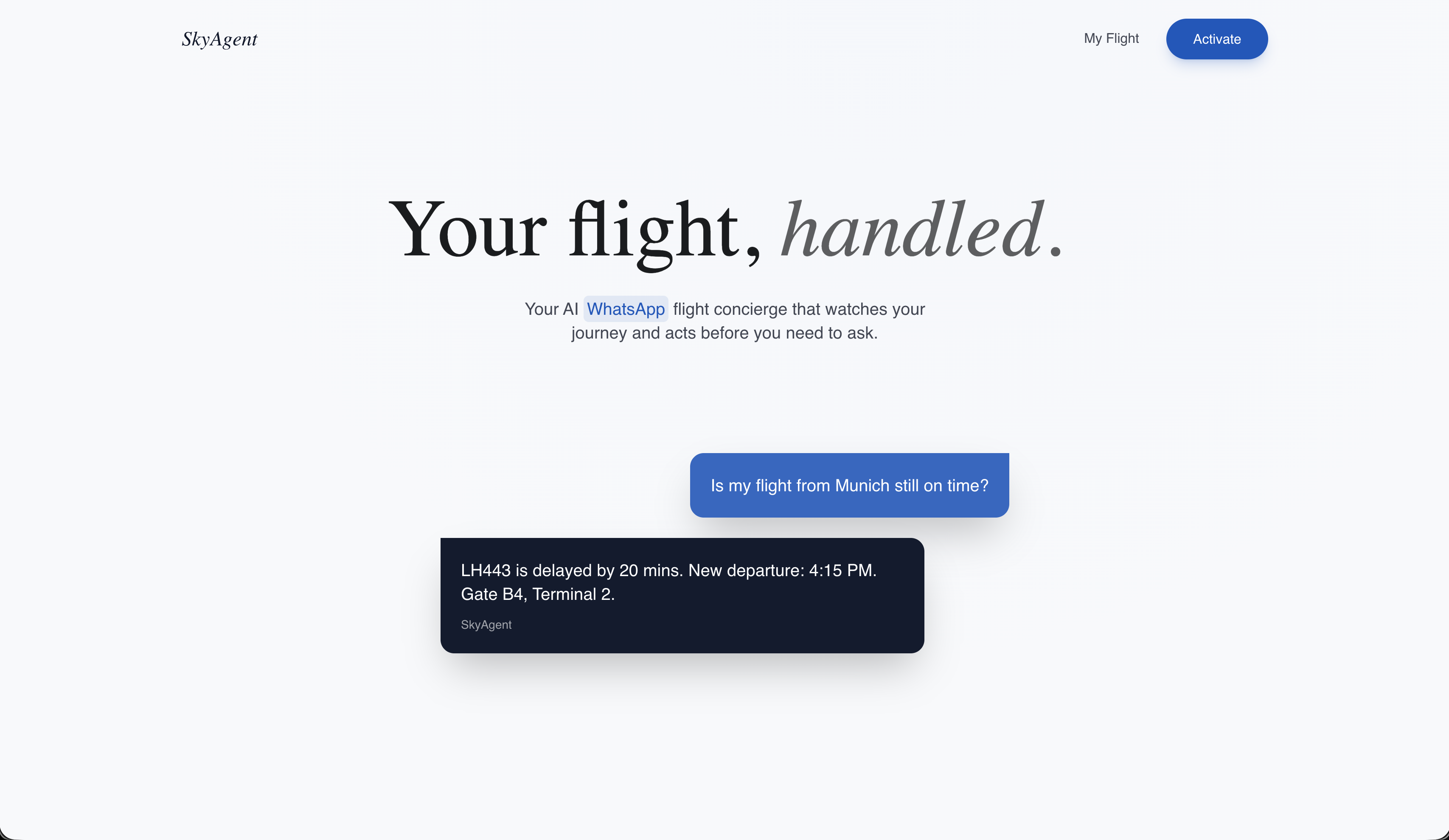
Most AI agents wait to be asked. SkyAgent reaches out first — keeping users proactively informed about updates such as gate changes, delays and lounge recommendations directly in WhatsApp.
WhatsApp has 3.3B MAU and requires no app install, making it the perfect distribution channel for a travel concierge.
Contents
Core features The architecture The API layer The Agentic layer The UI layer Challenges Stack + costs What's next
Core features
- Subscribe to flights and proactively get notified on flight updates.
- Ask questions about lounges, weather and transportation in natural language.
- The system automatically unsubscribe you after the flight lands + 24h.
- Message the SkyAgent your new flight number + departure date to resubscribe anytime.
- Text "stop" to unsubscribe and have your data completely erased.
The architecture
The system has three layers:
- The API layer — routes, webhooks, cron jobs
- The Agentic layer — Chat-SDK (WhatsApp adapter), AI-SDK (LLM inference)
- The UI layer — web app, WhatsApp
And three main flows:
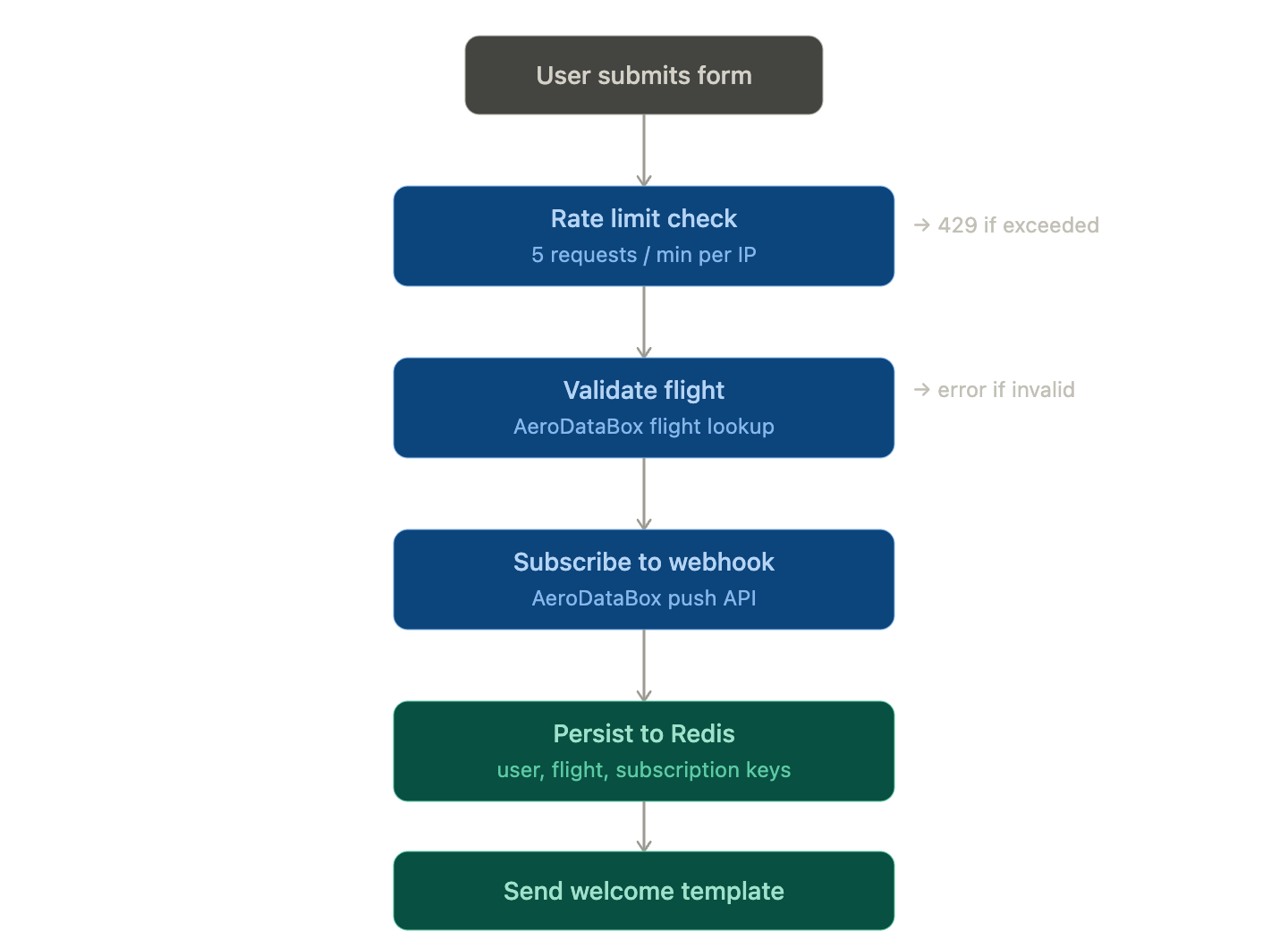
Subscription flow: User submits form → Rate limit check → Validate flight → Subscribe to webhook → Persist user and flight info to redis → Send welcome template
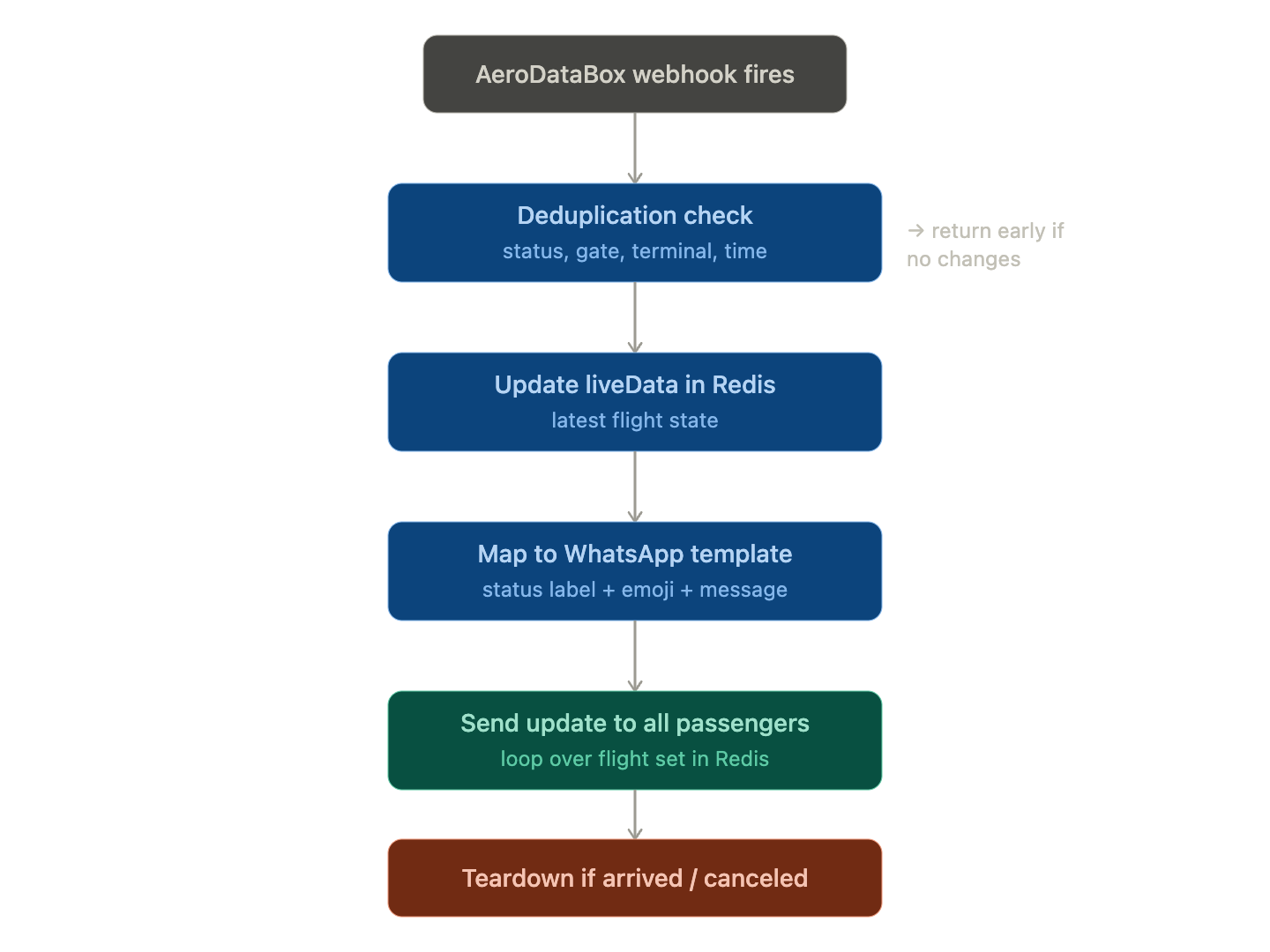
Flight updates flow: AeroDataBox webhook fires → Deduplication check → Update live data in Redis → Map to WhatsApp template → Send update to all subscribed passengers → Teardown if arrived/canceled
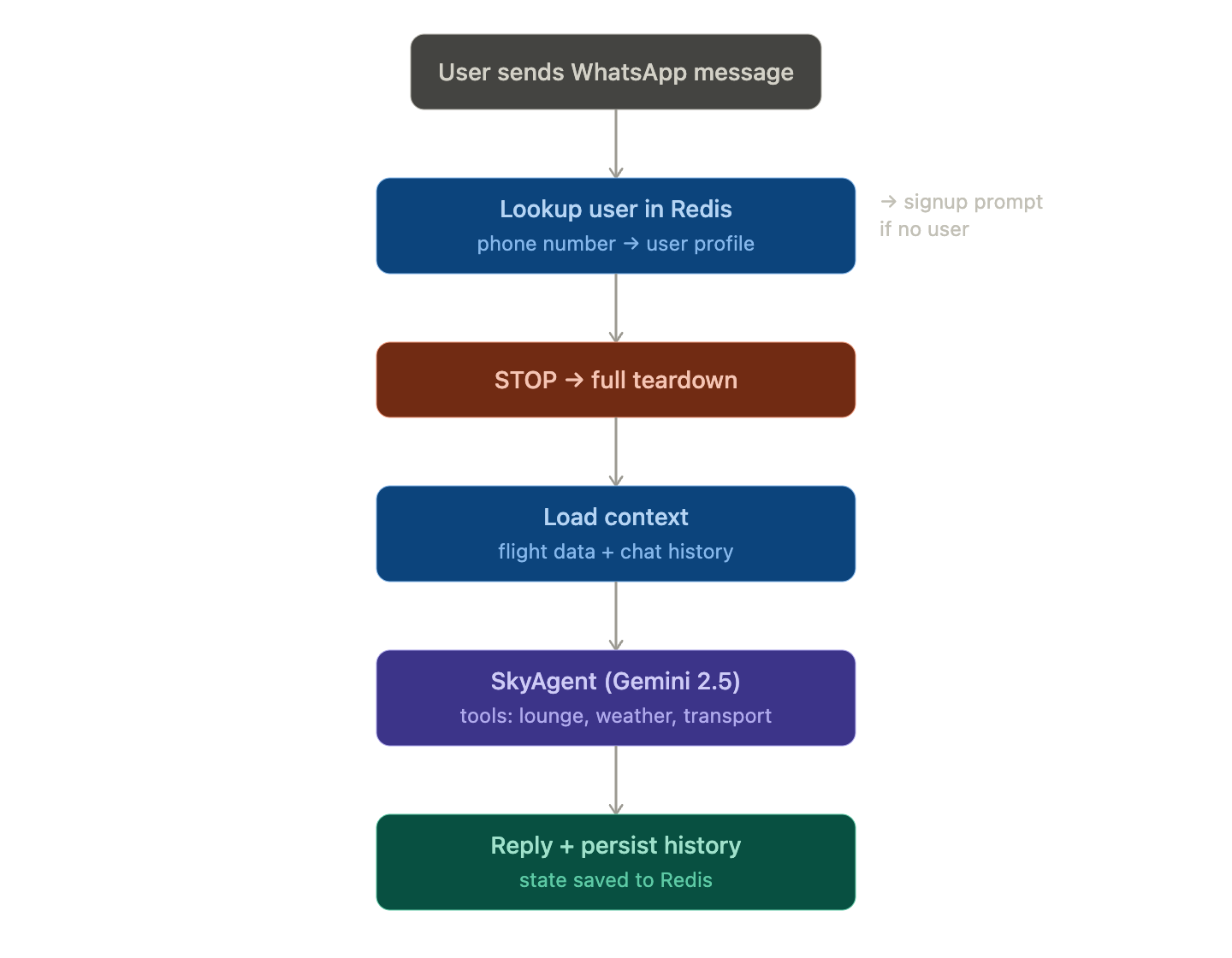
Conversation flow: User sends WhatsApp message → Lookup user in Redis → Load context (flight data + chat history) → LLM inference via AI-SDK instance (Gemini 2.5) → Reply + persist history (state saved to Redis) → User texts stop → full teardown
The API layer
The API layer includes routes for subscribing and unsubscribing to flights and webhooks for handling flight and whatsapp updates.
Data storage
For storage solution I’m using Upstash Redis — a serverless, low-latency, key-value store that proved itself to be just right for this usecase of frequent read/write operations with an easy to use API similar to local storage.
The event engine
The most complex part of the API was the flight-updates webhook — the “event engine” of the system, responsible for caching, normalization, deduplication and mapping flight updates to corresponding WhatsApp templates.
Deduping
Since AeroDataBox is very “talkative” an early deduplication guard clause became necessary to avoid sending redundant messages to users. It’s done by confirming if the webhook payload differs from the cached Redis “liveData” key. Only if there’s a change I proceed looping through all subscribed users redis.smembers and finally send the flight update to the user via Meta’s WhatsApp API.
Failsafe teardown
An important part of the system was to delete data and unsubscribe from AeroDataBox once a flight landed. In order to cover all edge cases I had to take a layered approach:
- Webhook: full teardown on statuses
arrivedandcanceled. - Cron job: runs daily and loops through all subscription keys in redis and runs the teardown for any stale subscription (departure date + 24h).
- TTL: as last line of defense I also set a TTL on all Redis keys based on departure time + 24h as a buffer.
- On "STOP": complete teardown including the user key is made anytime the user text “stop” to the agent, re-subscription is then only possible via the signup form.
For user data I decided on a one year TTL so that the WhatsApp conversation with the Agent could be kept alive, this allows the users to subscribe to new flights just by sending the new flight number and departure date without having to visit the signup form again.
The Agentic layer
The intelligence layer of the system is handling the incoming and outgoing WhatsApp messages between the Meta API and the user’s phone with LLM inference in between.
Chat-SDK (the bridge)
The Chat-SDK is the transportation layer between the system and WhatsApp. It handles the incoming and outgoing communication via GET and POST handlers in a webhook.
The Chat-SDK instance uses the WhatsApp adapter and all of the control flow logic is handled inside the onNewMention and onSubscribedMessage hooks.
Chat history is persisted using thread.setState with state.history — without this the AI would lose all context between messages. To achieve a personalized experience I also needed to fetch the user and latest flight data from Redis and pass it to the AI-SDK as context in order to answer reliably and specifically to the user’s questions.
AI-SDK (the brain)
Since SkyAgent is a WhatsApp app, it follows a request/response pattern rather than a streaming one, generateText is the method used for handling model inference and tool calling. For the system prompt Vercel has solid prompt engineering guidance here — according to which tools should be limited to around max 5 for best results, which shaped the MVP tool selection.
For v1, the agent has access to 5 tools:
- getSupportLinks — surfaces airline-specific support links for common queries
- getLoungeInfo — retrieves lounge access details by airport code via loungeinfo.com
- getGroundTransport — looks up ground transport options by city via rome2rio.com
- getWeatherForecast — pulls destination weather by city via accuweather.com
- subscribeToFlight — registers the user for real-time flight status notifications
Gemini 2.5 flash seems to be perfect for a high volume application that doesn’t require advanced reasoning capabilities but rather prioritizes speed and affordability.
It was satisfying spinning up all tools and watching the agent come to life when accurately selecting tools corresponding to what’s asked in natural language, Vercel’s frameworks just get’s out of your way and let’s you build.
The UI layer
Web app
The web app is built on Next.js 16 using the App Router, with a sign-up flow and a flight dashboard that pulls live flight data from Redis — departure, destination, flight number etc. I'm using Framer Motion for animations and dark mode via the prefers-color-scheme media query. I vibe-designed the landing page using Google Stitch and Figma.
Building for WhatsApp meant spending around 90% of the time on backend, AI and infra. The work involved defining and submitting message templates through Meta's business.facebook.com console and then making sure the template names and variables in my code mapped exactly. Meta's review process takes around 1-2 days. I found it satisfying to integrate an AI-experience into a rustic message platform like WhatsApp, almost like putting a tesla roadster engine into a fiat punto.
Challenges
Vercel
One gotcha with hosting on Vercel was that serverless functions terminate once the response is sent, hence I eventually found out it’s necessary to use after() inside the WhatsApp webhook to enable message processing and AI inference after the 200 OK is returned to Meta — eventually found this info in the documentation buried deep in a Chat-SDK example.
AeroDataBox
The flight push API doesn’t automatically unsubscribe flights nor always send status arrived after arrival so to avoid unnecessary costs I had to implement a daily cron job that loops through all subscription keys in Redis and unsubscribes any stale ones.
WhatsApp templates
The meta business interface is confusing and lacks a good navigation. In the console my time was spent on creating the flight update and welcome templates, getting them approved took around 1-2 days and I’m currently in the process of getting my business account approved so to make the SkyAgent look more legit with a proper business phone number and a logo.
Testing
The development required a lot of curl and postman testing through a local ngrok tunnel, which actually worked remarkable well, only gotcha was to remember updating the callback URL in the facebook developers console to point to ngrok vs vercel respectively during dev and prod test phases.
Stack + costs
| Category | Tool | Details |
|---|---|---|
| APIs | AeroDataBox | Flight push API — $5.35/month |
| APIs | Meta | WhatsApp messaging/templates — pay as you go |
| Backend | Upstash | Serverless Redis — free up to 500K commands/month |
| Backend | QStash | Serverless cron — free up to 1000 messages/day |
| Backend | Next.js | API routes / webhooks — 1M function calls/month free |
| AI | AI-SDK | LLM inference |
| AI | Chat-SDK | WhatsApp adapter |
| AI | Gemini 2.5 Flash | Speed + affordability at scale — $0.30/1M input tokens, $2.50/1M output tokens |
| Frontend | Next.js | Framework |
| Frontend | Tailwind | Styling |
| Frontend | SWR | Data fetching |
| Frontend | Framer Motion | Animations |
| Frontend | Lucide React | Icons |
| Design | Figma | UI design |
| Design | Stitch | AI design generation |
What's next
Airlines already have the passenger data so a B2B collaboration could unlock more powerful capabilities like rebooking, upgrades and other customizations. WhatsApp penetration in key markets exceeds 90% making it a truly exciting alternative to traditional apps for companies. This MVP proves that agentic systems can be integrated into established mediums such as messaging apps and provide a truly useful on-demand experience.
Try the SkyAgent here with a real flight number and let me know what you think.